Introduction
Before discovering ArgoCD, my Kubernetes deployments looked like a never-ending cycle of:
kubectl apply -f yaml- Fix something → apply again
- Change namespace → apply again
- Update image → apply again
It worked… but it wasn’t scalable, repeatable, or reliable.
Then I learned GitOps, and everything clicked.
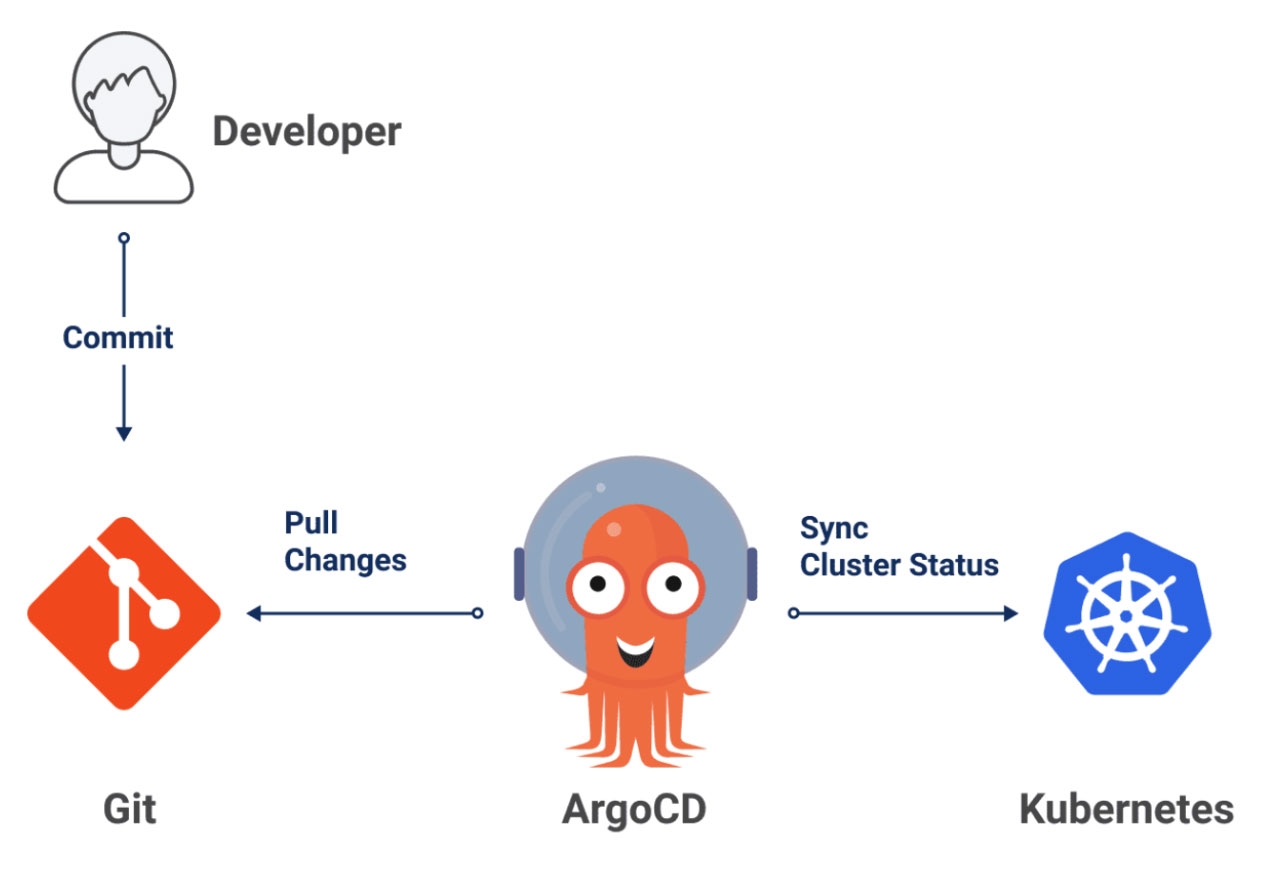
ArgoCD took the pain out of Kubernetes deployments by turning Git into the single source of truth.
No more manual updates.
No more YAML confusion.
No more “I forgot to apply the latest change.”
ArgoCD is simple:
Whatever you push to Git → is what runs in your cluster.
What I Used to Think About ArgoCD
Initially, I thought ArgoCD was just another CI/CD tool—like Jenkins or GitHub Actions—but with a fancy UI.
I assumed it was:
- A deployment dashboard
- Some automation scripts
- Just another Kubernetes add-on
And that’s the mistake many beginners make.
ArgoCD is not a CI/CD tool.
It’s a GitOps controller, and that changes everything.
My New Understanding of ArgoCD
Now I understand ArgoCD as the “brain” of GitOps for Kubernetes.
Here’s what ArgoCD actually does:
1. Continuously watches your Git repo
It doesn’t wait for you to run commands.
It checks Git, detects changes, and syncs them automatically.
2. Ensures your cluster ALWAYS matches Git
If someone accidentally changes something manually in the cluster, ArgoCD can:
- Detect the drift
- Alert you
- Fix it automatically
3. Visualizes the entire app state
ArgoCD’s UI shows:
- Pods
- Deployments
- Services
- Sync status
- Health status
All in one place.
4. Makes deployments predictable
No “it works on my machine” issues.
No version mismatch.
No accidental overwrites.
Git becomes the source of truth.
Why GitOps Matters
Before GitOps, deployments often looked like chaos:
- Different YAMLs across teams
- Manual merges
- Missing documentation
- Manual
kubectl apply - Difficult rollbacks
GitOps fixes all of these.
With GitOps:
- Every change is tracked
- Rollbacks are easy
- Approvals happen through pull requests
- Deployment history is clean
- Teams collaborate smoothly
ArgoCD is the best implementation of GitOps for Kubernetes.
ArgoCD Architecture (Simplified)
ArgoCD consists of a few core components:
1. API Server
Handles CLI & UI requests.
2. Repository Server
Clones Git repos and reads manifests.
3. Application Controller
The “brain” that compares Git vs cluster and syncs changes.
4. Redis (Optional)
Used for caching and performance in large environments.
5. UI Dashboard
Visualizes application health & sync status.
How ArgoCD Works — Step by Step
Here’s the typical flow:
- You push your Kubernetes manifests to a Git repository.
- ArgoCD pulls the repo and reads your desired state.
- It compares Git (desired state) vs cluster (actual state).
- If they differ, ArgoCD highlights a drift.
- You can sync manually or enable Auto-Sync.
- ArgoCD applies changes and keeps everything consistent.
Basic ArgoCD Application Example
A simple ArgoCD application YAML:
apiVersion: argoproj.io/v1alpha1
kind: Application
metadata:
  name: my-app
spec:
  project: default
  source:
    repoURL: https://github.com/yourname/k8s-manifests
    targetRevision: main
    path: my-app
  destination:
    server: https://kubernetes.default.svc
    namespace: production
  syncPolicy:
    automated:
      prune: true
      selfHeal: true
This tells ArgoCD to:
- Watch your Git repo
- Auto-sync new changes
- Remove deleted resources
- Self-heal when drift happens
Key Features That Make ArgoCD Amazing
- Auto-Sync
- Deploy automatically when Git changes.
- Self-Healing
- If a pod or deployment is manually modified, ArgoCD restores it.
- Application Rollbacks
- Rollback to any previous Git commit instantly.
- Multi-Cluster Support
- Deploy apps across multiple clusters from one place.
- RBAC + SSO
- Secure and enterprise-ready.
- UI + CLI + API
- Flexible for all workflows.
Real-World Use Cases
ArgoCD is widely used in production by:
- Kubernetes-native companies
- Teams practicing GitOps
- DevOps teams managing microservices
- Platform teams building internal developer platforms
- Large enterprises with multi-cluster deployments
It’s especially powerful for:
- EKS
- GKE
- AKS
- On-prem clusters
- Multi-environment setups (dev / staging / prod)
Resources That Helped Me
- ArgoCD Official Docs Clean examples and architecture diagrams.
- TechWorld with Nana Great GitOps + ArgoCD visuals.
- KodeKloud GitOps Course Hands-on practice without breaking anything.
- Argo Project GitHub Real-world configurations used by the community.
Conclusion
ArgoCD is one of those tools that instantly upgrades your DevOps workflow. It removes manual deployments, fixes drift, handles rollbacks, and simplifies Kubernetes operations. With ArgoCD + GitOps:
- Deployments become automatic
- Infrastructure becomes predictable
- Teams collaborate better
- Downtime decreases
- Confidence increases
This blog is just the start. I’ll soon write more about:
- Setting up ArgoCD in Kubernetes
- ArgoCD vs Flux
- Automating environments using GitOps
- Real deployment examples with Helm
ArgoCD doesn’t just deploy apps-it transforms the way teams ship software.