Getting Started with Docker: A Practical Guide for Beginners
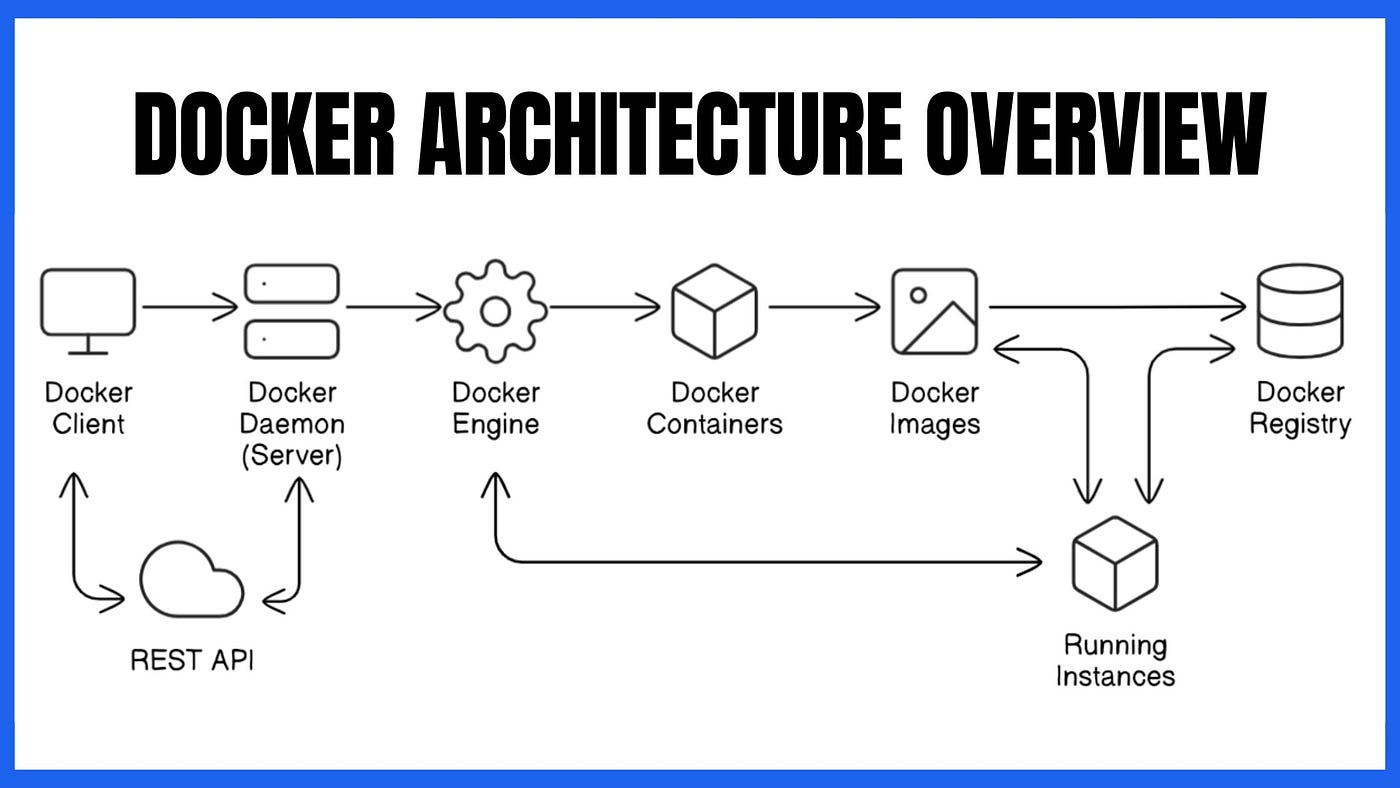
Docker has become one of the most essential tools for developers, DevOps engineers, and backend teams. It helps you package your application and its dependencies into lightweight, portable containers—making deployments predictable and consistent across environments.
If you’re just getting started, this guide will walk you through the basics: what Docker is, why it matters, and how to use the core commands.
🚀 What Is Docker?
Docker is a containerization platform. Containers are like small, isolated environments that run your application with everything it needs—libraries, configs, dependencies—without affecting your system.
In simple words:
- No more “works on my machine.”
- Same behavior in dev, staging, and production.
- Faster deployments and easy scaling.
🧱 Image vs Container
Before using Docker, understand two key terms:
Docker Image
- A blueprint for a container.
- Read-only and reusable.
- Created from a
Dockerfile.
Docker Container
- A running instance of an image.
- Lightweight and isolated.
- Can be started, stopped, removed.
Image = Recipe
Container = Final dish
🛠 Installing Docker
Download Docker Desktop from the official website according to your OS.
Once installed, verify:
docker --version📦 Your First Container
Let’s run a basic container using a public image. Example: Running Nginx
docker run -d -p 8080:80 nginxNow open: http://localhost:8080 Congrats—your first container is live.
🧪 Essential Docker Commands
Here are the commands you’ll use every day:
List images
docker imagesList running containers
docker psList all containers (including stopped)
docker ps -aStop a container
docker stop <container_id>
Remove a container
docker rm <container_id>Remove an image
docker rmi <image_name>📄 Creating Your Own Docker Image
Create a file named Dockerfile:
FROM node:18
WORKDIR /app
COPY . .
RUN npm install
CMD ["npm", "start"]
Build the image:
docker build -t my-node-app .Run it:
docker run -p 3000:3000 my-node-app🗂 Docker Compose (Bonus)
Compose helps run multi-container setups like:
- Backend
- Database
- Cache
- Reverse proxy
Example
docker-compose.yml:
version: '3'
services:
  web:
    image: nginx
    ports:
      - "8080:80"
  redis:
    image: redis
Run:
docker compose up🔥 Why Developers Love Docker
- Eliminates environment issues
- Works the same on any machine
- Faster CI/CD pipelines
- Great for microservices
- Easy scaling in cloud environments
📌 Final Thoughts
Docker is not just a tool—it’s a mindset. Once you understand how images, containers, and volumes work, a huge part of modern DevOps becomes much clearer. This guide gives you a strong foundation. Next steps could include:
- Docker Compose
- Volumes & networks
- Building production-ready Dockerfiles
- Deploying containers on AWS, Kubernetes, or ArgoCD
Keep experimenting and containerizing your apps—your DevOps journey just got way smoother.