Introduction
Before I learned Kubernetes, managing multiple containers felt like trying to control a group of kids at a birthday party—everyone running in different directions, random crashes, and something always needed restarting. Scaling apps or keeping them alive? Pure chaos.
Kubernetes fixed that.
It provides a powerful system that can deploy, scale, heal, and manage containerized applications automatically. It abstracts away the operational headaches and brings order to container orchestration.
But if you’re just starting out, Kubernetes can feel like a giant maze: clusters, pods, nodes, deployments, services, ingress, volumes… where do you even begin?
Let’s break it down slowly, clearly, and practically.
My previous idea about Kubernetes
When I first heard about Kubernetes, I assumed it was just “Docker but complicated.” Most tutorials online didn’t help either. They often jump straight into YAML files or install Minikube without explaining why Kubernetes exists in the first place.
The typical content looked like:
- “Deploy Your First Pod in Kubernetes”
- “Kubernetes in 10 Minutes”
- “Master Kubernetes YAML Quickly”
It’s no surprise beginners don’t understand the real concepts behind it. Kubernetes isn’t about YAML. It isn’t just another tool. It’s a complete system that solves big problems of scaling and reliability.
And honestly, no one tells you that clearly in the beginning.
My new understanding of Kubernetes
As I explored Kubernetes deeper, I realised it’s way more than just “running containers.” It’s an entire ecosystem that manages applications in production environments at scale.
Here are the core concepts I now understand and keep exploring:
-
Cluster:
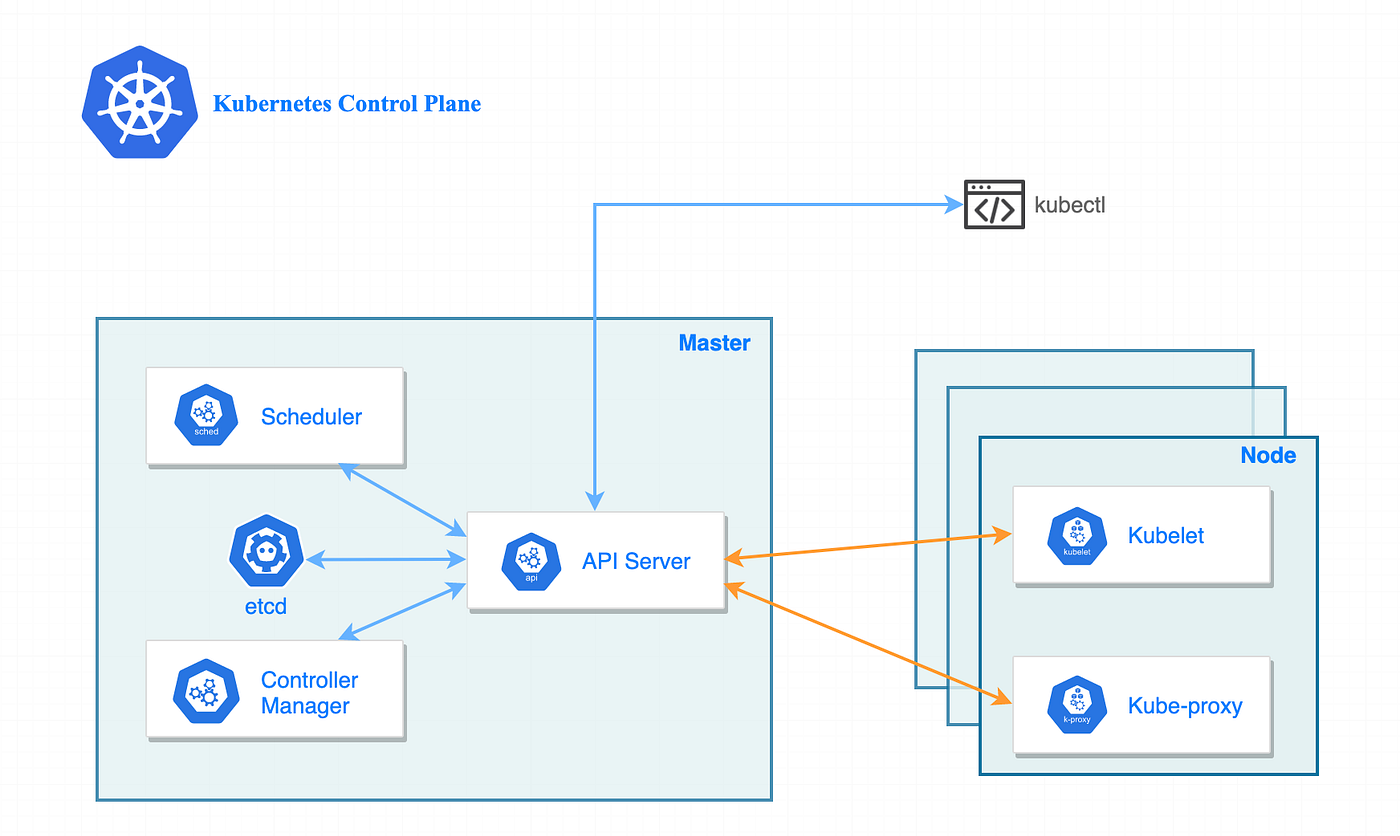
A group of machines (nodes) managed together to run containerized workloads. -
Nodes:
The worker machines that actually run your containers. The Control Plane manages them. -
Pods:
The smallest deployable unit in Kubernetes—basically a wrapper around one or more containers. -
Deployments:
Define how many replicas of your application should run and manage updates automatically. -
Services:
Provide stable networking for pods. Even if pods die or restart, the service endpoint stays the same. -
Ingress:
Acts like the gateway to your cluster—manages HTTP/HTTPS traffic from the outside world. -
ConfigMaps & Secrets:
Store configurations and sensitive info the right way, without hardcoding into images. -
Persistent Volumes:
Keep your data safe even when pods are destroyed or recreated. -
Autoscaling:
Automatically adjusts the number of pod replicas based on CPU, memory, or custom metrics.
Foundations matter
Kubernetes is powerful, but without understanding the fundamentals, it feels like magic that randomly breaks.
One thing that helped me a lot was learning the concepts behind Kubernetes—like container orchestration, distributed systems, health checks, and scaling—before going deep into the YAML.
For example:
- Understanding why containers need orchestration before learning what a “Pod” is.
- Knowing the difference between stateless vs stateful apps before touching StatefulSets.
- Learning load balancing fundamentals before using Kubernetes Services.
- Understanding reverse proxies before using Ingress controllers like Nginx or Traefik.
If you jump straight into applying YAML files from the internet, you’ll run applications, sure…
But you won’t know how to debug when things go wrong.
Concepts first → Kubernetes second.
This mindset has made me a much better DevOps engineer. Tools change fast — Docker, Kubernetes, Nomad, OpenShift — but concepts like scheduling, scaling, networking, and resilience? Those stay constant.
Resources That Helped Me a Lot
-
Kubernetes Official Documentation
Surprisingly beginner-friendly once you know what you’re looking for. -
TechWorld with Nana
Her Kubernetes diagrams and animations are literal life-savers for visual learners. -
KodeKloud
Hands-on labs that help you get real experience without breaking your system. -
Hussein Nasser
Even though he’s more into backend systems, his explanations helped me understand distributed system concepts deeply.
Conclusion
Kubernetes can feel intimidating at first, but once you understand the core pieces—pods, deployments, services, and nodes—it starts making a lot more sense. It’s not just a tool; it’s a platform that powers modern applications at massive scale.
This blog is only the beginning.
In the upcoming posts, I’ll break down each Kubernetes concept in detail and build real projects to understand how everything fits together. From setting up clusters to deploying production-ready applications, there’s a lot to explore.
Stay tuned—our Kubernetes journey has just started!